Adding Source Servers
Once the RiverMeadow infrastructure components have been deployed to the source and target environments, the source servers that will be migrated need to be added to the source inventory in the RiverMeadow platform.
Adding source servers to the RiverMeadow source inventory can be performed using the following methods:
- RiverMeadow UI: Source servers for OS based migrations can be added manually using the RiverMeadow portal.
- CSV Upload: Source servers for OS based migrations can be added in bulk by uploading a CSV file via the RiverMeadow portal.
- VMware vSphere Discovery: Source servers for VM based migrations can be added in bulk via the RiverMeadow integration with the source VMware vCenter to inventory existing virtual machines using the vSphere REST API.
- REST API: Source servers for OS based migrations can be added in bulk in a programattic fashion using the RiverMeadow REST API.
- UI
- CSV
- API
RiverMeadow UI
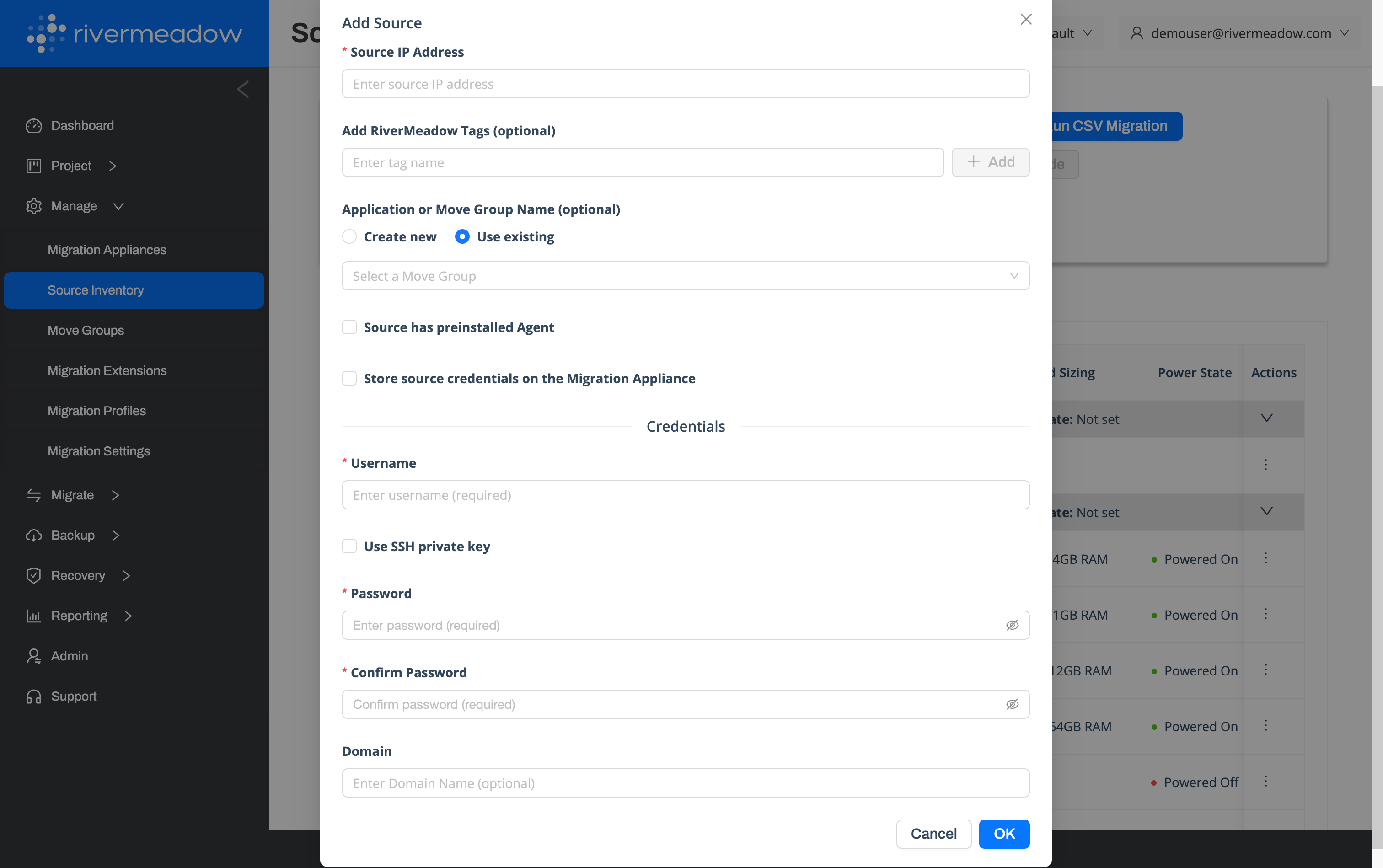
For OS based migrations, source servers can be individually added to the source inventory using the RiverMeadow web portal.
- Source IP Address: The IP Address of the source server. This IP address must be reachable from the RiverMeadow migration appliance and the instance that will be created in HPE Morpheus VM Essentials.
- Tags: RiverMeadow tags associated with the inventoried source server for organization or filtering purposes.
- Move Group: The RiverMeadow move group to assign to the source server to within the inventory.
- Pre-Installed Agent: Whether the RiverMeadow migration utility has already been deployed to the source server using a method seperate from the automated migration utility deployment performed by the RiverMeadow platform.
- Store Source Credentials: Whether to store the credentials utilized to authenticate to the source server on the migration appliance or not.
- Username (Optional): The username of the user account used to automate the deployment of the RiverMeadow migration utility on the source server.
- Private Key (Optional): The SSH private key of the user account used to automate the deployment of the RiverMeadow migration utility to the source server.
- Password (Optional): The password of the user account used to automate the deployment of the RiverMeadow migration utility to the source server.
- Domain (Optional): The domain associated with the user account used to automate the deployment of the RiverMeadow migration utility to the source server.
RiverMeadow tags are used only by the platform are not applied to the source or target servers.
CSV Upload
Source servers can be added in bulk using a Comma Seperated Value (CSV) file.
Reference Fields
The following table details the supported fields for a CSV upload:
| Name | Description | Required |
|---|---|---|
| host | The IP Address of the source server. This IP address must be reachable from the RiverMeadow migration appliance and the instance that will be created in HPE Morpheus VM Essentials. | Yes |
| username | The username of the user account used to automate the deployment of the RiverMeadow migration utility on the source server. | No |
| password | The password of the user account used to automate the deployment of the RiverMeadow migration utility to the source server. | No |
| private_key | The SSH private key of the user account used to automate the deployment of the RiverMeadow migration utility to the source server. | No |
| agent | whether or not you want to pre-install an RMS agent. "yes" = pre-install an RMS agent; "no" = do not pre-install an RMS agent. | Yes |
| domain | The domain associated with the user account used to automate the deployment of the RiverMeadow migration utility to the source server. | No |
| move_group_name | The RiverMeadow move group to assign to the source server to within the inventory. | No |
| target_migration_date | The target date for the server to be migrated within the RiverMeadow platform | No |
| assigned_resource_email | The email address for the person assigned to the move group | No |
| cloud_sizing | The target cloud and the size of the instance to be created for the source on the target cloud | No |
| tags | The RiverMeadow tags to associate with the inventory record in the RiverMeadow platform | No |
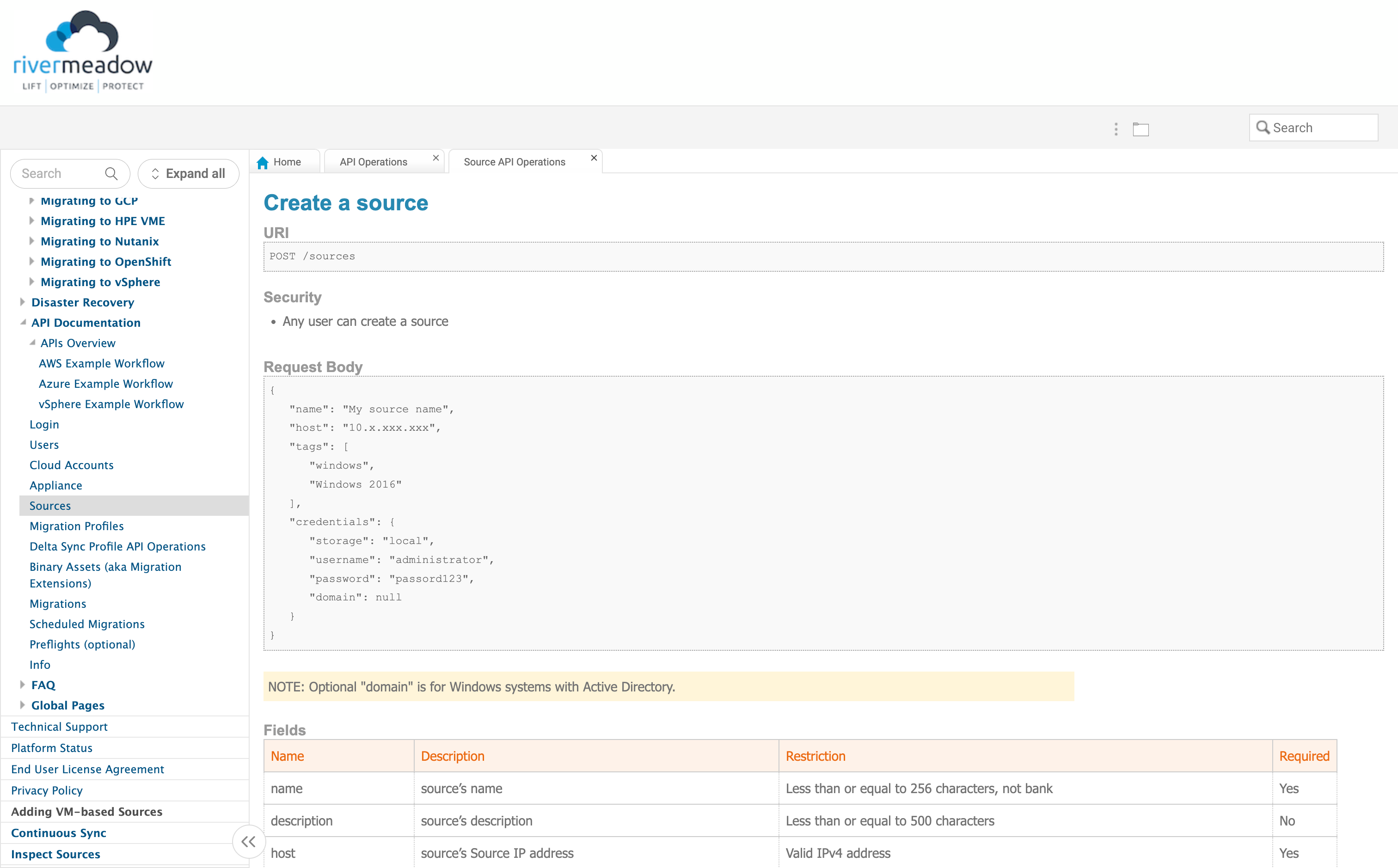
REST API
The RiverMeadow REST API can be used to programatically populate the source inventory. This enables source servers to be added using programming languages such as Python or Golang.