Workload Modernization
One of the considerations that organizations face with migrations is whether to move workloads as-is (lift and shift) or go through the process of refactoring applications for containerization or cloud native alignment (modernization). Lift and shift migrations bring the same problems into the new environment and refactoring is often costly and time-consuming. The RiverMeadow platform provides a streamlined modernization capability to accelerate technical debt reduction during the workload migration.
Operating System Modernization
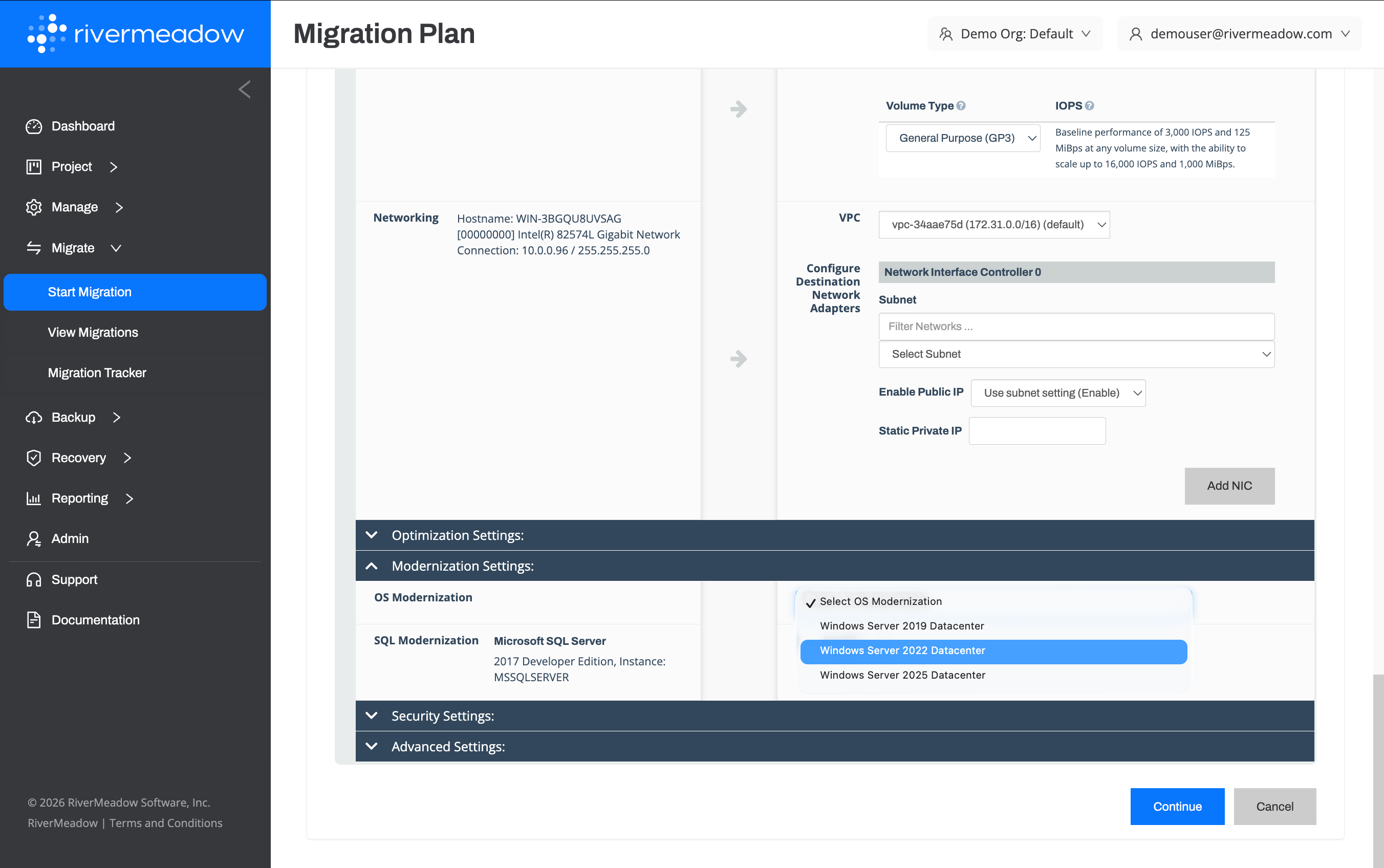
The RiverMeadow platform supports the automated upgrade of Linux and Windows operating systems to go from older versions to newer versions. The process is done in a derisked fashion as the platform creates an exact copy of the source system and performs the automated upgrade of the operating system on the clone.
Key Benefits
The following are key benefits of the operating system modernization feature:
- Risk-free Upgrades: The operating system modernization uses a clone based methodology to remove the risk associated with performing in-place upgrades that rely on snapshots and typically require an extended period of downtime simply for testing the upgrade.
- Improved Security Posture: Applying security patches to systems in a timely manner is one of the key pillars of IT security. Operating systems that have reached end of life and no longer receive security patches from the vendor pose a significant security risk. Upgrading the operating system is the only way to receive regular security patches for end of life operating systems.
- Eliminate Microsoft ESUs: Microsoft Window Server operating systems that have reached the end of mainstream support enter a three (3) year period where they are eligible to continue to receive security updates but at an additional cost each year during the three (3 year period). Upgrading the operating system to a newer version eliminates this additional cost.
- Reduced Technical Debt: Each operating system version that needs to be managed in an IT environment requires different considerations such as different patches, different security configurations, and more. Consolidating the number of different operating systems in the environment streamlines operational tasks and considerations by allowing IT staff to focus on a smaller number of operating system verisons.
OS Modernization Examples
The following are examples of modernization that can be completed utilizing the OS Modernization feature:
Windows Server 2008 R2 to Windows Server 2022
The Windows Server 2008 R2 operating system is an end of life product and is also no longer eligible for extended security updates. This poses a significant risk to the security posture of the organization and should be remediated as quickly as possible. Automate the upgrade from Windows Server 2008 R2 to Windows Server 2022 using the RiverMeadow platform.
Red Hat Enterprise Linux 6.x to Red Hat Enterprise Linux 9.x
Automate the upgrade of systems running older versions of Red Hat Enterprise Linux (RHEL) like 6.x to a newer version like 9.x to remove the older operating systems from the environment.
SUSE Linux 12 to SUSE Linux 15
Automate the upgrade of systems running older versions of SUSE Linux like 12.x to a newer version like 15.x to remove the older operating systems from the environment.
A detailed list of supported operating systems that can be upgraded is available in the RiverMeadow documentation: https://docs.rivermeadow.com/support-matrix-for-os-modernization.
Microsoft SQL Server Modernization
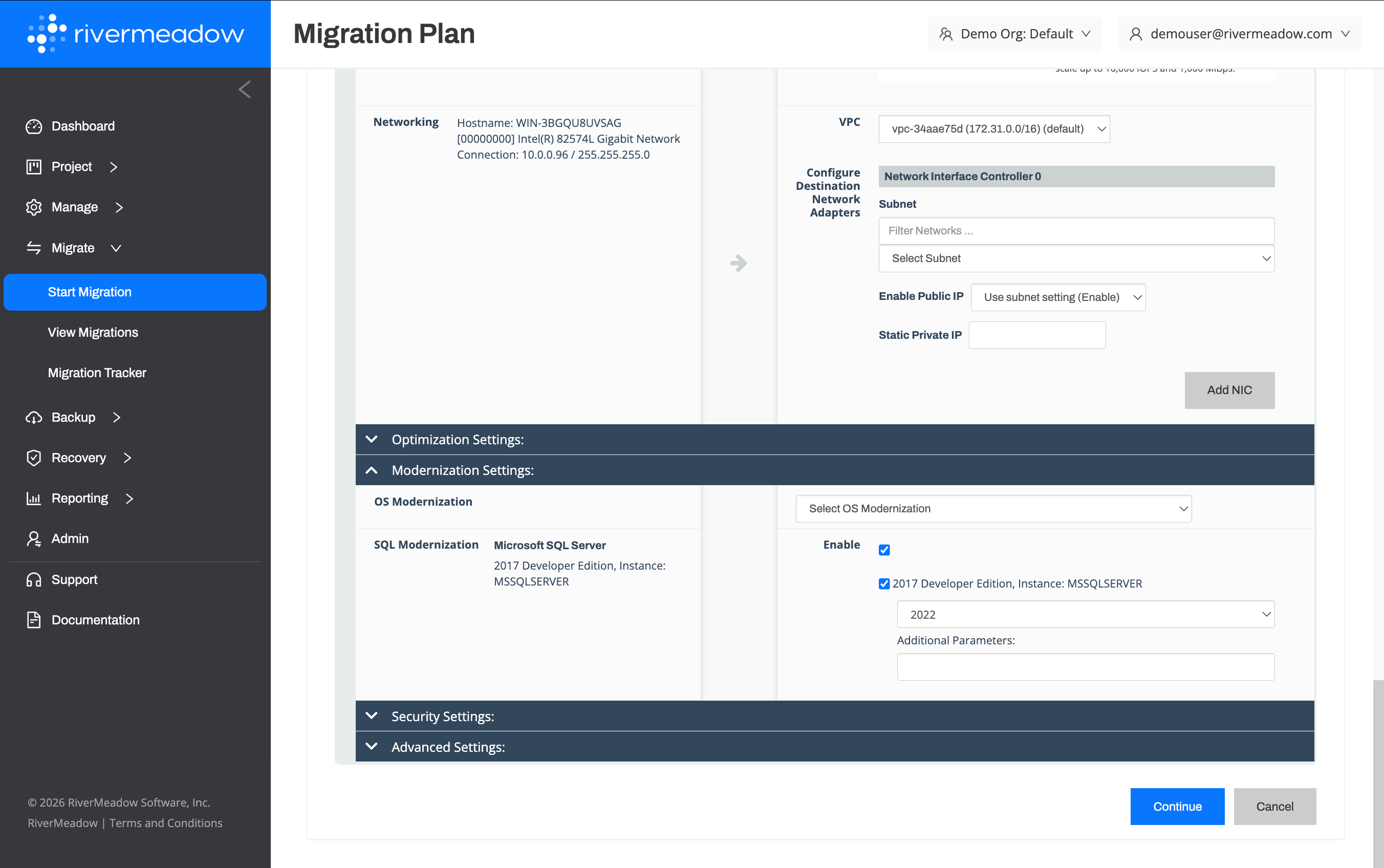
The RiverMeadow platform supports the automated upgrade of Microsoft SQL Server to go from older versions to newer versions. The process is done in a derisked fashion as the platform creates an exact copy of the source system and performs the automated upgrade of Microsoft SQL Server on the clone.
- Improved Security Posture: Applying security patches to applications in a timely manner is one of the key pillars of IT security. Versions of Microsoft SQL that have reached their end of life and no longer receive security patches from Microsoft pose a significant risk to organizations.
- Eliminate Microsoft ESUs: Microsoft SQL Server versions that have reached the end of mainstream support enter a three (3) year period where they are eliglbe to continue to receive security updates at an additional cost each year.
- Reduced Technical Debt: Each SQL Server version that needs to be managed in an environment requires different considerations such as different patches, different security configurations, and more. Consolidating the number of versions of Microsoft SQL Server in the environment streamlines operational tasks and considerations by only needing to worry about a few versions.
SQL Modernization Examples
The following are examples of modernization that can be completed utilizing the SQL Modernization feature:
Microsoft SQL Server 2014 to Microsoft SQL Server 2022
Automate the upgrade of Microsoft SQL Server 2014 to Microsoft SQL Server 2022 during the migration to eliminate the technical debt but also the annual fees for extended security updates (ESUs).
A detailed list of the supported versions of Microsoft SQL Server that can be upgraded is available in the RiverMeadow documentation: (https://docs.rivermeadow.com/support-matrix-for-app-modernization)
Linux OS Conversion
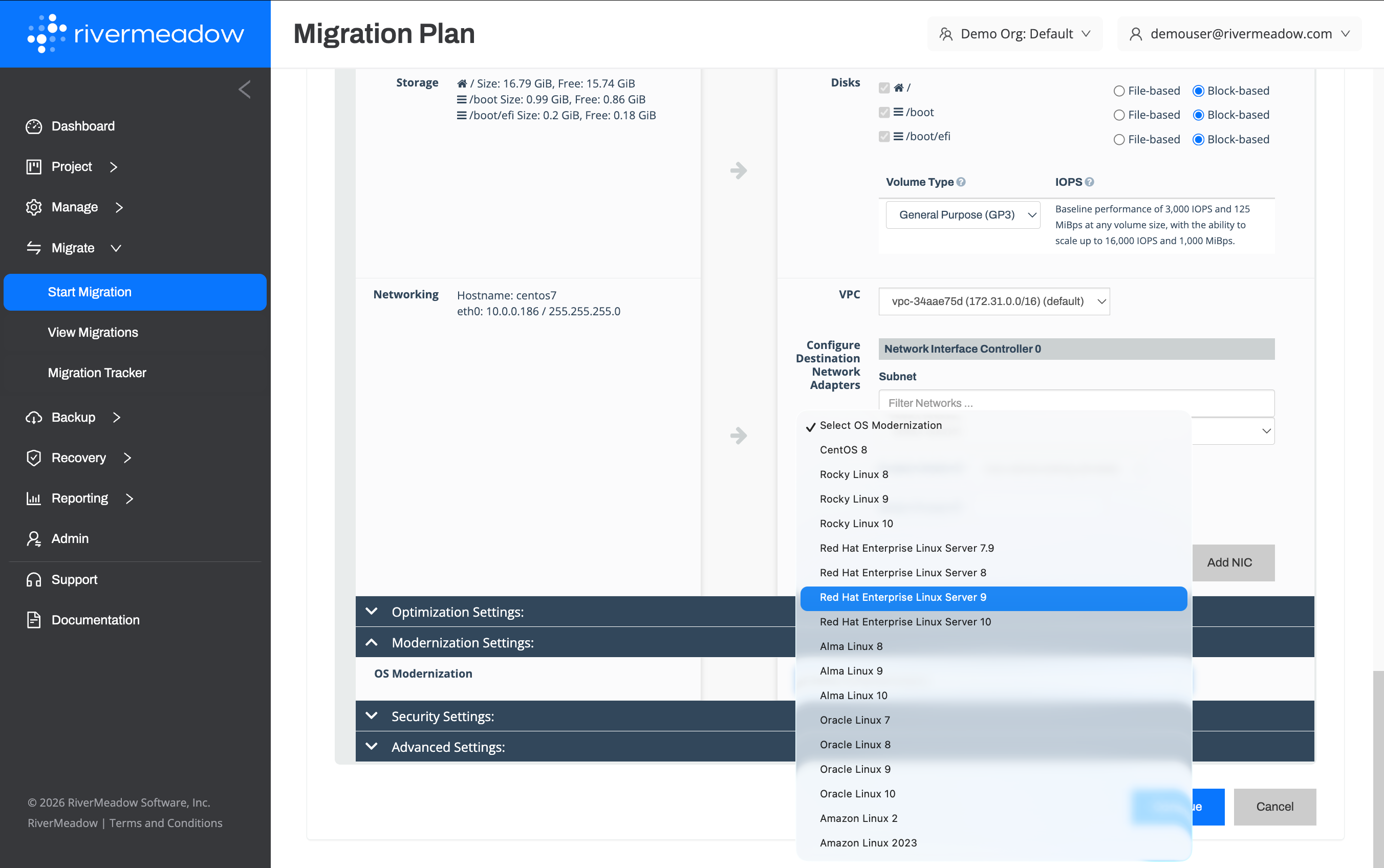
The RiverMeadow platform supports the automated conversion of Linux distributions that are RPM-based derivatives. The process is done in a derisked fashion as the platform creates an exact copy of the source system and performs the automated conversion to the desired Linux distribution on the clone.
Key Benefits
The following are key benefits of the automated Linux OS conversion feature:
- OS Consolidation: Managing multiple distinct Linux distributions creates a management overhead burden as IT administrators need to account for minor differences between distributions. The ability to standardize on a subset of distributions or on a single distribution reduces or eliminates that additional overhead.
- Sunset Deprecated Operating Systems: Operating systems such as CentOS are viewed as deprecated and migrating to a distribution like Rocky Linux or AlmaLinux can be seen as a daunting project full of risks. The OS conversion feature eliminates the risk of conversion and accelerates the process with the platform's automation.
- Reduced Licensing Costs: Many organizations are migrating workloads to public clouds such as Amazon and as part of that migration they are considering what operating systems make sense for them moving forward. Red Hat Enterprise Linux (RHEL) is one such operating system and organizations are reducing their RHEL licensing costs by transitioning to an operating system like Amazon Linux. The RiverMeadow platform enables this OS conversion in a seamless fashion during the migration process.
Examples
The following are examples of conversions that can be completed utilizing the OS conversion feature:
CentOS to Rocky Linux
CentOS was traditionally a popular linux distribution that provided organizations with a cost effective alternative to Red Hat Enterprise Linux (RHEL). The changes to the way that the distribution is managed has created concern for many organizations and prompted many to look at alternatives. The platform's OS conversion feature enables workloads running CentOS to be migrated to an alternative such as Rocky Linux, AlmaLinux, Rocky Linux, or others.
Red Hat Enterprise Linux (RHEL) to Amazon Linux
Many organizations utilize Red Hat Enterprise Linux (RHEL) as the standard Linux distribution of choice in their on-premises estate. Amazon Linux is an rpm-based Linux distribution that is an alternative to Red Hat Enterprise Linux (RHEL) that is optimized for running on EC2. This provides an opportunity for organizations to eliminate their licensing costs for RHEL by transitioning to Amazon Linux. The conversion from Red Hat Enterprise Linux (RHEL) can be automated during the migration using the RiverMeadow platform's OS conversion capablity.
A detailed list of supported Linux operating systems that can be converted is available in the RiverMeadow documentation: https://docs.rivermeadow.com/support-matrix-for-os-modernization.